
Claude integration
Claude kanban integration: let Claude work on your boards
Kanduck is a free kanban board that Claude can read and edit over MCP. Claude plans the cards, moves work along and tells you what changed. You decide how much it may do, and you can undo what it did.
Add Kanduck in Claude Setup in the docs
A verified connector in the Claude directory. Free for up to 10 people, every feature included.
How to connect Claude to Kanduck
Claude on the web, desktop and mobile
- Open Kanduck in the Claude directory and add it. Or open Settings, then Connectors, choose Add custom connector, name it Kanduck and paste
https://kanduck.com/mcp. - Kanduck opens an approval page. Sign in if it asks, so Claude connects to your boards and not an empty new account.
- Choose what Claude may do (Read only, Propose changes or Can edit) and whether it sees all your boards or one. Tap Connect.
- Ask Claude about your boards.
Claude Code
claude mcp add --transport http kanduck https://kanduck.com/mcpThen run /mcp inside Claude Code, choose kanduck, sign in, and approve it on the Kanduck page that opens.
To disconnect, open Invite your AI in Kanduck and remove the connection. Claude stops on its next call. The docs cover other AI apps and reconnecting an app that stopped working.
What Claude can do on a Kanduck board
The connector gives Claude 15 tools. Which of them can change anything depends on the level you chose.
| Tool | What Claude uses it for | Changes the board |
|---|---|---|
list_boards | See your boards with their lists and card counts | No |
get_board | Read every list and card with notes, checklists and due dates | No |
search_cards | Find cards by words in the title or notes, across boards | No |
board_activity | See what changed recently on a board | No |
my_proposals | Check what happened to its own proposals: pending, approved, rejected | No |
create_board | Start a board, with To do, Doing and Done by default | Yes |
add_list, update_list | Add a list, or rename it and change its colour or emoji | Yes |
add_cards | Add up to 50 cards at once, with notes, checklists, labels and due dates | Yes |
update_card, move_card, copy_card | Edit a card, move it to another list, or duplicate it | Yes |
set_labels | Define the board's labels | Yes |
delete_card, delete_list | Delete a card, or a list with its cards. Both go to Trash for 30 days | Yes |
Agent permissions: what Claude may do, and who decides
Each Claude connection gets its own name, its own level and, if you want, a single board. You set all of it when you approve the connection and can change or remove it later.
- Read only. Claude can read and search. It cannot change anything.
- Propose changes. Claude can read and ask for edits. Each edit becomes a proposal and the board stays as it was until you approve it. Kanduck's server enforces this, so it does not depend on Claude behaving.
- Can edit. Claude edits directly. Every change is labelled with the connection's name on the board and in History, and can be undone.
Only the board's owner, and invited members who have verified their email, can approve, reject or undo. Claude cannot approve its own proposals. Agent control shows the whole propose, review, approve and undo flow with screenshots.
A real use case: planning a launch with Claude
The example below uses the tools above. You have a board called Launch and you type:
Plan the launch of my app on my Launch board. Add cards for the landing page, pricing, and the announcement, with due dates, and a checklist on the announcement.
- Claude calls
list_boardsandget_boardto find the Launch board and see its lists. - It calls
add_cardsonce with every card, each with its due date, and a checklist on the announcement. - In Can edit the cards appear on the board, labelled with the connection's name. In Propose changes a bar appears above the lists saying changes are waiting, and you review each request in plain words and approve or reject it.
- Later you ask Claude to move what is finished to Done and say what changed. It uses
search_cards,move_cardandboard_activity. - If something is wrong, open History in Kanduck and undo that action or that whole run. If Claude deleted something, Put back restores it from Trash.
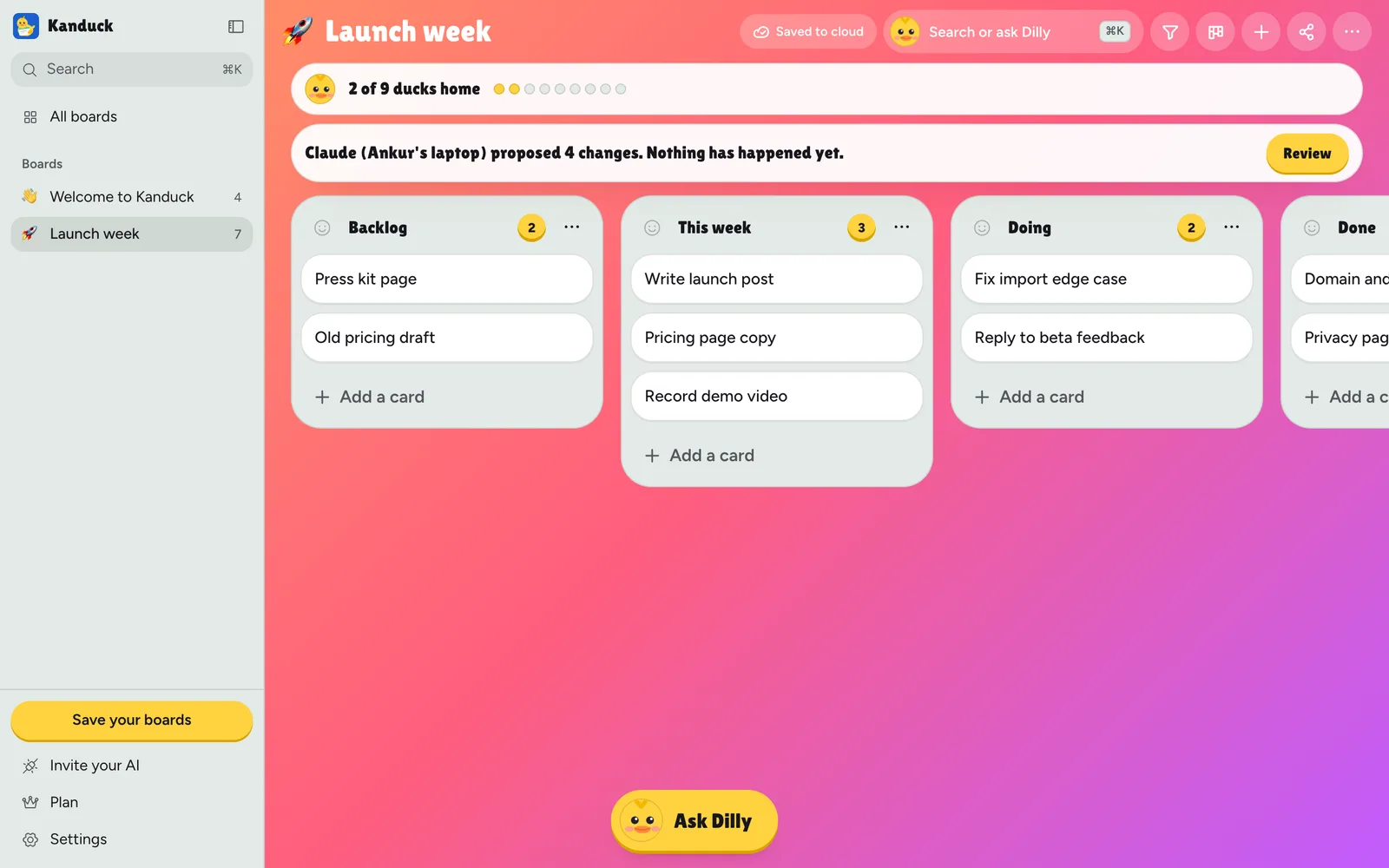
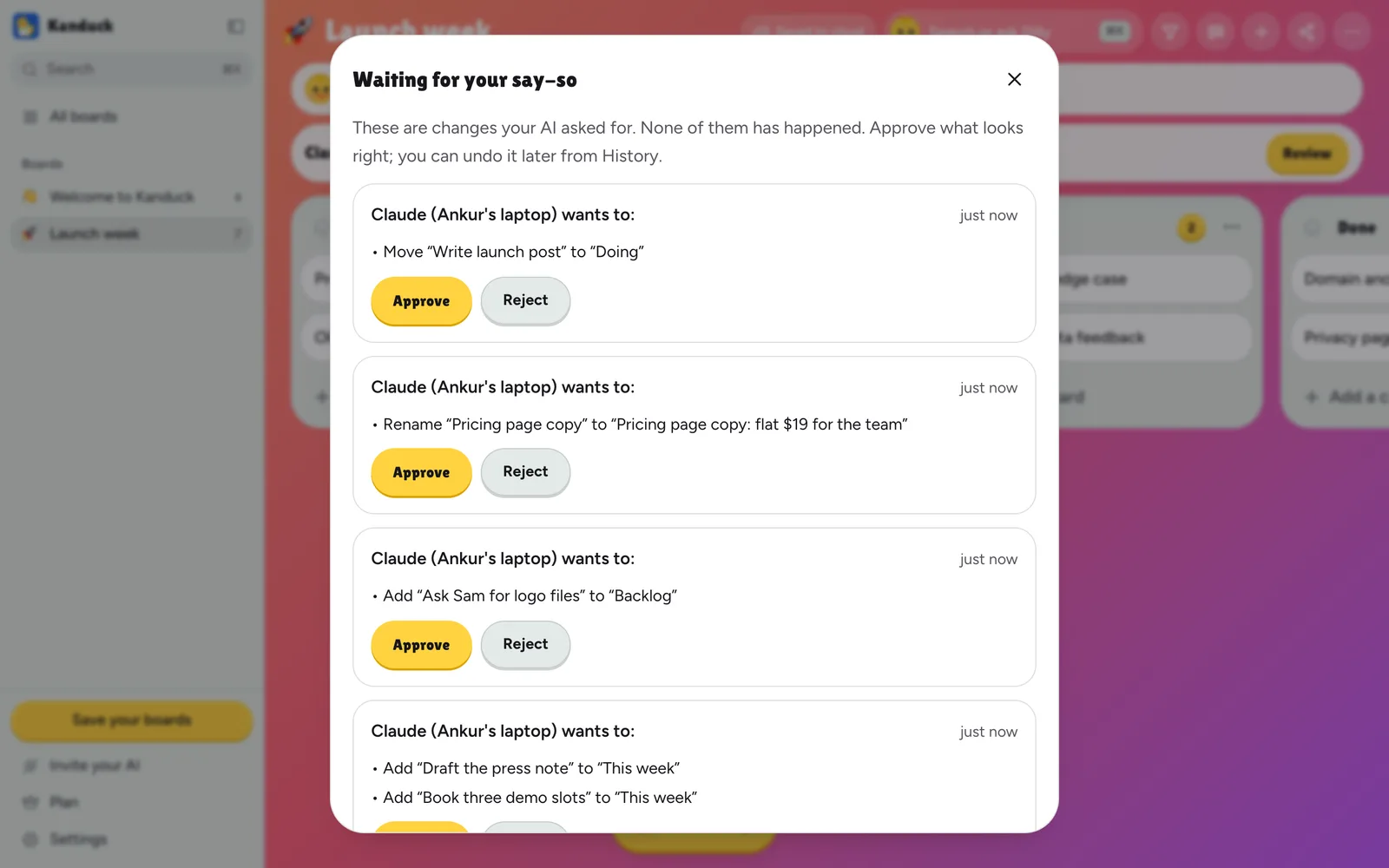
The screenshots come from a demo board driven by a scripted MCP client, not a recording of a Claude session. The connection's name on a real board is whatever the person connecting it types, and Claude fills it in with the app's own name.
What to know before you connect
- Anthropic verified the connector for the Claude directory. Kanduck's developer makes and runs it, and you still choose what it may do on your boards.
- Propose changes controls AI apps connected over MCP. Dilly, Kanduck's built-in assistant, and people's own edits are not held for approval.
- Undo covers the last 30 days and 500 changes per board. A card you edited after Claude is left alone, not merged.
- What Claude deletes goes to Trash for 30 days. What a person deletes is gone. Privacy explains what happens to older history.
- Connectors need a Claude plan that allows them. Check Claude's own pricing for which plans do.
Questions
Does Kanduck work with Claude?
Yes. Kanduck is a connector verified by Anthropic in the Claude directory, and it also works as a custom connector at https://kanduck.com/mcp. Claude on the web, desktop and mobile, and Claude Code, can read your boards, add and edit cards, and search across boards over MCP.
Can Claude change my board without asking?
Only as far as you allow. You pick Read only, Propose changes or Can edit when you connect it. In Propose changes mode every edit waits for you. In Can edit mode Claude edits directly, every change is labelled, and you can undo it from History.
What happens if Claude deletes a card or list?
It goes to the board's Trash for 30 days with its chat and files, and you can put it back as it was. Kanduck's tools tell Claude to delete only when you clearly asked.
Is the connector made by Anthropic?
No. Kanduck's developer makes and runs it. Anthropic has verified it for the Claude directory.
Is the Claude integration free?
Kanduck is free for up to 10 people with every feature, including the Claude connection. Teams past 10 pay one flat price for the whole workspace, not per person. See pricing. You also need a Claude plan that allows connectors.
Can I limit Claude to one board?
Yes. When you approve the connection you choose all your boards or one, and you can disconnect it any time under Invite your AI.
What about ChatGPT, Codex and other AI apps?
Kanduck speaks MCP, so other apps can connect to the same address. The docs have steps for Codex, Grok and Muse and a settings-file shape for other MCP apps.
Related
- Agent control: propose, review, approve and undo, with screenshots
- Docs: connect an AI app and review, undo and trash
- AI kanban board: Dilly and AI apps on the same boards
- Trello alternative and pricing
Try it on a board of your own
Make a board, add Kanduck in Claude, and start in Propose changes mode if you want to see every edit first.